

Download E.M. Total Video Converter Command Line – video converter, command line, mobile video conversion, video editing, video sharing site, server-side scripting
Overview
E.M. Total Video Converter Command Line is a specialized utility designed for users who require precise, automated video processing on Windows and Linux systems. Built as a console-based application, it serves as a powerful backend tool for converting and editing video files without the need for a graphical interface. This makes it ideal for developers, system administrators, and content creators working in automated environments or server-side workflows. The app supports a wide range of input and output formats, including FLV, SWF, AVI, WMV, MP4, 3GP, MPG, MOV, MP3, DV, and AAC, ensuring broad compatibility across platforms and devices.
Its primary purpose is to streamline video conversion, particularly for mobile devices such as PSP, PS3, iPod, and iPhone, by offering pre-configured profiles that eliminate the need for manual format selection. This functionality is especially valuable for users managing large media libraries or integrating video processing into automated pipelines. The tool also enables advanced editing tasks such as trimming, resizing, and combining clips, making it a multifunctional asset for video professionals. Additionally, it supports the creation of thumbnail images and the addition of subtitles and watermarks, enhancing content customization.
For developers and webmasters, the inclusion of full PHP source code for a demo video hosting site represents a significant advantage. This allows for the rapid deployment of custom video sharing platforms. Although the developer did not provide additional technical details about deployment or scalability, the tool’s command-line nature suggests integration into existing scripts and systems. It fills a niche in the video processing ecosystem by offering a lightweight, scriptable solution for users who prioritize automation, efficiency, and control over user-friendly interfaces.
Key Features & Functionality
- Multi-Format Support: Handles an extensive list of video and audio formats, including MP4, AVI, MOV, WMV, FLV, SWF, 3GP, MPG, MP3, DV, and AAC, ensuring compatibility with virtually any media file.
- Mobile-Optimized Conversion Profiles: Automatically adjusts video settings for devices like PSP, PS3, iPod, and iPhone, guaranteeing smooth playback without manual configuration.
- Advanced Video Editing Tools: Allows users to trim, resize, and merge video clips, providing granular control over content structure and dimensions.
- Subtitle and Watermark Integration: Enables the addition of text subtitles and custom watermarks, improving content branding and accessibility.
- Thumbnail Generation: Automatically creates image previews for video files, useful for content organization and web presentation.
- Full PHP Source Code for Video Hosting: Includes a complete demo video sharing site with documentation, enabling users to build custom platforms similar to YouTube.
- Server-Side Scripting Integration: Designed for use with CGI and other server-side languages, allowing webmasters to embed video processing directly into websites, blogs, or forums.
These features make the tool highly effective in real-world scenarios such as batch processing video libraries, automating content preparation for mobile delivery, or integrating video conversion into a content management system. For example, a developer managing a video blog could use the command line interface to automatically convert uploaded videos to multiple formats and generate thumbnails upon upload. Similarly, a media company could use the tool to prepare content for distribution across multiple platforms with consistent quality and branding.
Interface, UX & Performance
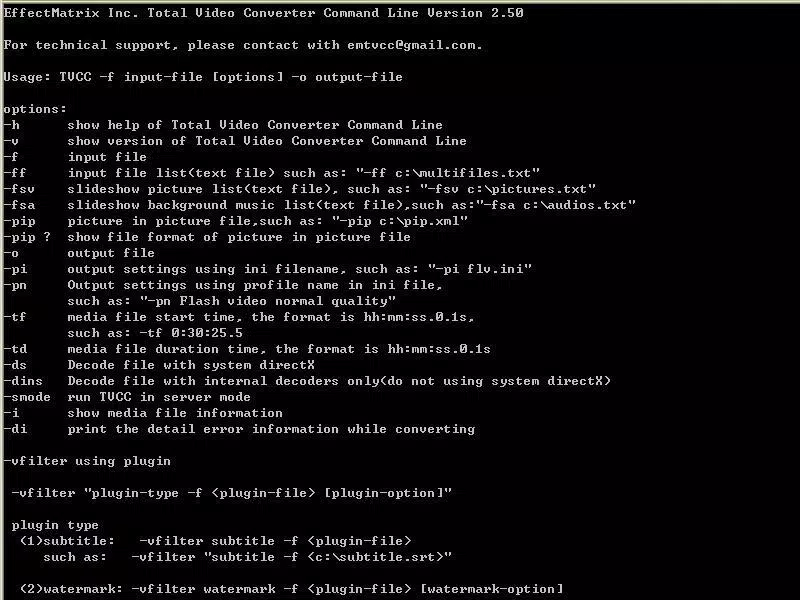
E.M. Total Video Converter Command Line operates entirely through a command-line interface, which means there is no graphical user interface (GUI) to navigate. This design choice reflects its intended use case: automation, scripting, and integration into server environments. While this may present a learning curve for users unfamiliar with terminal-based tools, it ensures minimal resource consumption and high performance in headless or remote systems.
Navigation is based on input commands and parameters, which require users to reference documentation or scripts to execute tasks. The lack of visual feedback or real-time progress indicators means users must rely on command output and logs to monitor conversion status. Although the developer did not list formal performance metrics, the tool’s lightweight size of 12.8 MB suggests efficient resource usage. It is expected to run smoothly on standard desktop and server hardware, especially when used in batch or scheduled operations.
Stability is likely high given the tool’s focus on automation and reliability. However, without detailed information on crash logs, error handling, or system compatibility beyond Windows and Linux (via Wine), users should proceed with caution in production environments. Responsiveness depends on system resources and command complexity, but for typical conversion tasks, the tool should deliver consistent results. Overall, the UX is optimized for technical users rather than general consumers, aligning with its purpose as a backend processing utility.
Platform Compatibility & Technical Requirements
E.M. Total Video Converter Command Line is available for Windows and Linux systems, with Linux support achieved through Wine, a compatibility layer for running Windows applications. This dual-platform availability allows users to deploy the tool across different operating environments, making it suitable for both desktop and server use. The software is distributed as a 12.8 MB file, indicating a compact footprint that minimizes storage and bandwidth requirements.
The application runs under Windows and Linux (via Wine), though specific OS versions were not listed. The developer did not specify minimum OS requirements, nor did they provide details on CPU architecture, RAM, or disk space needs. Compatibility information was not fully disclosed, so users should verify system readiness before installation. The software version is 1.0.0.1, indicating a stable initial release with no public update history provided.
Given the command-line nature of the tool, it does not require a graphical environment, which enhances its flexibility in headless servers or virtual machines. However, users must ensure that Wine is properly configured on Linux systems to run the Windows binary. This may require additional setup steps, especially for non-standard distributions or older Linux kernels.
Pros and Cons
Pros
- Supports a wide range of video and audio formats for maximum compatibility.
- Offers optimized profiles for mobile devices, simplifying cross-device playback.
- Includes advanced editing features such as trimming, resizing, and merging.
- Provides full PHP source code for building a video sharing site, enabling rapid platform development.
- Designed for seamless integration with server-side scripting languages like CGI.
- Lightweight at 12.8 MB, suitable for low-resource environments.
Cons
- No graphical user interface; requires command-line expertise.
- Linux support depends on Wine, which may introduce compatibility issues.
- Specific system requirements were not listed, making setup potentially uncertain.
- Price point of $49.95 may be high for casual users or small-scale projects.
- Developer did not provide documentation on error handling or troubleshooting.
FAQ
Is E.M. Total Video Converter Command Line safe to download and install?
Yes, the software is distributed by eTinysoft, the official developer. As with any third-party tool, users should ensure they download from verified sources to avoid tampering.
Can I use this tool on macOS?
There is no official macOS support. The tool is designed for Windows and Linux (via Wine), and no native macOS version was provided.
Does the software support batch conversion?
Yes, its command-line interface is well-suited for scripting batch operations, allowing users to process multiple files automatically.
What is included with the PHP source code?
The package includes a fully functional demo video hosting site written in PHP, along with documentation and tutorials to assist in setup and customization.
How do I update the software?
Update availability was not specified. Users should check the developer’s official website for future releases or version upgrades.
Final Thoughts + CTA
E.M. Total Video Converter Command Line is a robust, scriptable solution tailored for developers, system administrators, and advanced users who need reliable, automated video processing. Its extensive format support, mobile optimization, and inclusion of a full video hosting platform make it a powerful tool in the digital media ecosystem. While the lack of a GUI and the need for command-line proficiency may deter beginners, the tool’s efficiency and flexibility offer significant value to technical users.
For those managing video workflows on servers, integrating conversion into web platforms, or building custom video-sharing sites, this application delivers a strong return on investment. The ability to automate complex tasks, combine editing features, and deploy scalable solutions sets it apart from consumer-focused tools.
Download E.M. Total Video Converter Command Line now


